WebArchive
Extractor
Convert a Safari .webarchive (web archive) file to plain HTML and assets you can host anywhere.

Get WebArchive Extractor
One-time purchase. macOS only. Instant download after checkout.
Convert .webarchive to HTML
Safari bundles saved web pages into a single .webarchive (web archive) file — all the HTML, CSS, images, and scripts packed together. That format only opens in Safari, and not reliably in newer versions.
WebArchive Extractor is a webarchive to html converter that unpacks that bundle into a normal folder of files: an HTML document and all its assets, side by side. The result opens in any browser and can be uploaded to any web server.
It also works with TextEdit — if you saved a rich document as a .webarchive, you can convert it to plain HTML the same way.
Demo
Screenshots
Features
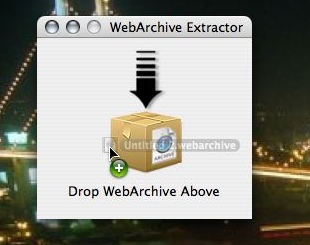
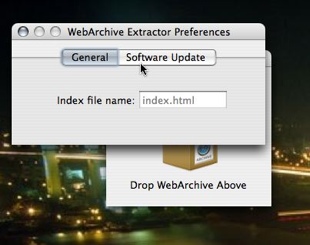
Drop a .webarchive file onto the app. No configuration needed.
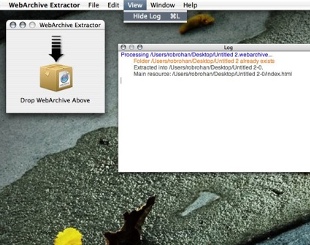
Extracts to a plain HTML file with all assets in a normal folder structure.
Convert .webarchive documents created in TextEdit into portable HTML.
Output files work on any static web server, local or remote.
One-time purchase. No account required. Works offline.
Built for macOS. Fast and lightweight.
FAQ
- How do I convert a .webarchive file to HTML?
- Drag the .webarchive file onto WebArchive Extractor. It converts the file into a standard HTML document and a folder of assets in seconds — no configuration needed.
- What is a .webarchive file?
- Apple's format for saving a complete web page from Safari — HTML, CSS, images, and all assets packed into one file. TextEdit can also save documents in this format.
- Why can't I just open the .webarchive in a browser?
- Only Safari can open them, and even then newer Safari versions can be unreliable. The format is proprietary and not supported by Chrome, Firefox, or any other browser.
- What do I get after extracting?
- A folder containing a standard HTML file and all the associated assets (images, stylesheets, scripts). You can open the HTML file in any browser or upload the folder to a web server.
- Does it work on Windows or Linux?
- No. WebArchive Extractor is macOS only.
- Can I use it with TextEdit documents?
- Yes. TextEdit can save rich text documents as .webarchive files. WebArchive Extractor converts those into plain HTML just like it does with saved web pages.